
You cannot make a compressed audio file better by editing it again. What you can do is avoid extra damage: start from the best source you have, plan cuts and timing changes to limit lossy exports, choose a suitable format where the tool offers a choice, and verify the result before deleting the original.
Lutrakit’s free Audio Cutter, Audio Merge, and Audio Speed run in the browser with no account required. The selected audio bytes stay on the device. The tools use FFmpeg-style decoding, filtering, and encoding inside the browser session, so the quality rule is the same as in desktop audio editing: filtering decoded audio and exporting to MP3 or Ogg means a new lossy encode. Exporting to WAV avoids a lossy codec stage, but the file is much larger.
Audio Cutter and Audio Speed keep the source file’s format; they do not offer an output-format selector. Audio Merge lets you choose MP3, WAV or Ogg. For further edits without another lossy codec stage, use the original WAV/FLAC master if you have one. Converting an already lossy source does not restore lost detail.
The simple rule: edit once from the best source
FFmpeg’s own documentation separates stream copy from transcoding: stream copy is fast and has no quality loss because it does not decode or re-encode, while transcoding decodes and encodes again and lossy encoders can degrade quality (FFmpeg documentation, accessed 2026-08-17). Lutrakit’s audio tools apply filters such as trim, fade, crossfade, concat, and tempo. Filters work on decoded audio frames, so plan the session as an export step, not as a reversible mastering system.
Use this decision table:
| Task | Best source | Safer output choice | Why |
|---|---|---|---|
| Cut a ringtone or excerpt | Original WAV/FLAC if available; otherwise the highest-quality copy | Source format retained; start from a WAV/FLAC master for further edits | Avoid repeated MP3/Ogg encodes. |
| Merge clips with fades | Clean source clips at similar loudness | WAV for a production intermediate, MP3/Ogg for final sharing | Crossfades require filtering and re-encoding. |
| Speed up speech | Original recording | Source format retained; start from a WAV/FLAC master for further edits | Tempo change creates new audio samples. |
Do not run “cut, then merge, then speed, then convert” as separate downloads unless you need to. Each lossy export can compound artifacts.
Cutting: choose boundaries and fades deliberately
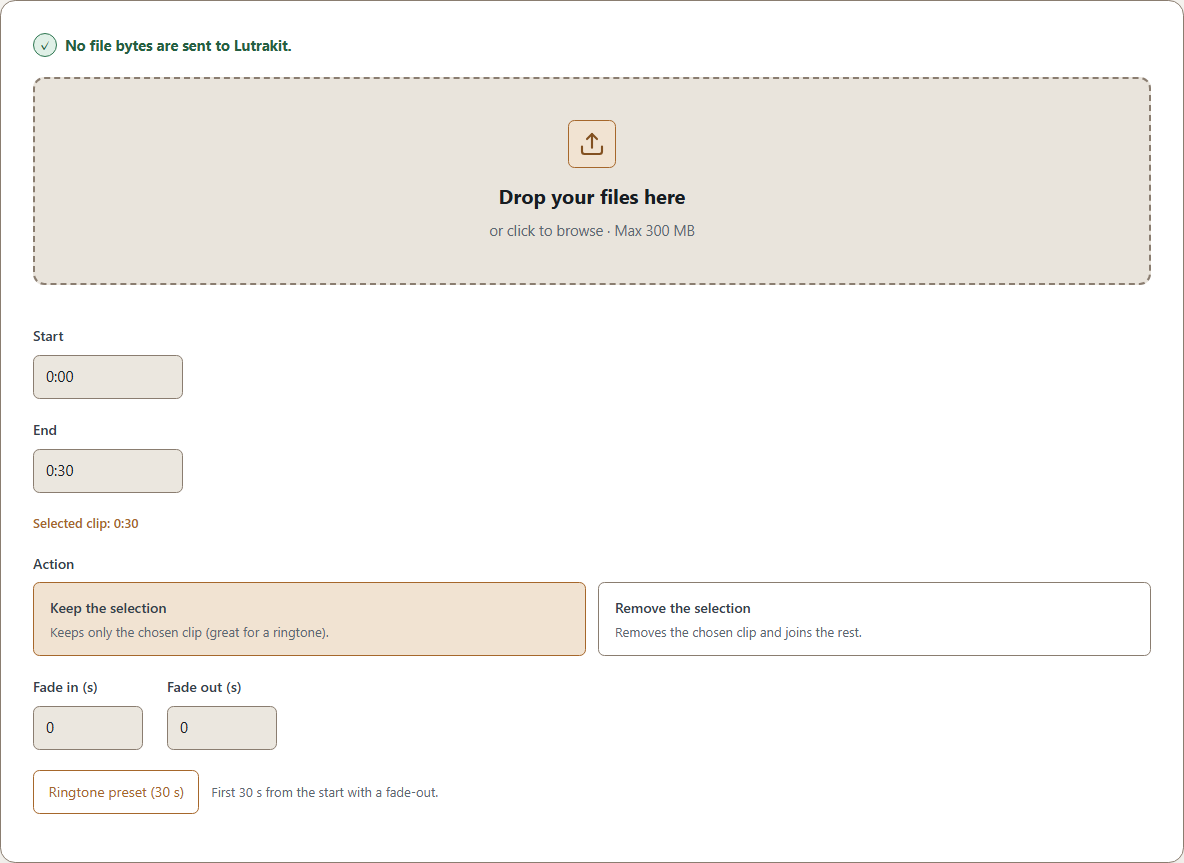
Audio Cutter accepts common audio files up to 300 MB. Its default selection is 0:00 to 0:30 in “keep” mode, with optional fade-in and fade-out. It can also remove a selected middle section and keep the surrounding audio.
For speech, leave a small breath before and after the selected sentence. Cutting exactly on a plosive or a loud transient can create a click. A very short fade, even 30-80 ms, is often enough to hide the edit. For music loops, listen to the beat and the reverb tail; a cut that looks exact on the timer can sound late because the musical phrase resolves after the waveform peak.
Lutrakit exposes a ringtone preset that keeps up to the first 30 seconds and adds a fade-out of up to 2 seconds, limited to the clip’s duration. Treat that as a convenience, not as a universal format rule. Phones, platforms, and social apps have their own limits.
Merging: hard joins, crossfades, and loudness
Audio Merge takes 2 to 32 files, with a 200 MB per-file limit and a 300 MB combined input limit before any lower device-memory cap. It can output MP3, WAV, or Ogg; the current defaults are merged.mp3, no crossfade, no fade-in, no fade-out. Crossfade and fade durations are limited to 0.1-10 seconds.
FFmpeg’s concat filter joins streams one after another, while acrossfade overlaps the end of one stream with the start of the next for a set duration (FFmpeg filters: concat and acrossfade, accessed 2026-08-17). Use a hard join when the clips already have clean starts and ends, such as numbered lecture parts. Use a crossfade when room tone, applause, or music beds would make the join obvious.
Before merging, put files in the final order and rename them if the order might be confusing. After export, listen to each join. A waveform that looks smooth can still contain a volume jump or a word cut in half.
Retiming: speed without pitch shift
Audio Speed changes playback speed from 0.25x to 4x and keeps pitch by using FFmpeg’s atempo filter chain. FFmpeg documents atempo as a tempo filter and notes that large tempo factors can be chained to avoid the sample-skipping behavior of factors above 2 (FFmpeg filters: atempo, accessed 2026-08-17). Lutrakit chains factors internally for speeds outside the simple 0.5-2 range.
For speech, 1.25x or 1.5x usually preserves intelligibility better than jumping straight to 2x. For music, tempo changes are more destructive because rhythm, transients, and room reverb all change. If the output sounds metallic or smeared, use a gentler factor or a dedicated audio workstation.
A reproducible example with three clips
Prepare three harmless audio files that you have the right to use. These names describe files to create, not samples supplied by Lutrakit:
voice-master.wav: 30 seconds of your own voice.intro.wav: 3 seconds of generated tone or original music sting.outro.wav: 3 seconds of generated tone or original music sting.
Workflow:
- Cut
voice-master.wavfrom 00:04.000 to 00:22.000 with 0.05 s fade-in and 0.08 s fade-out. - Merge
intro.wav, the cut voice clip, andoutro.wavwith a 1.5 s crossfade, output WAV. - Speed the merged file to 1.25x for a review copy.
Expected checks, to be recorded after a real run:
| Check | Expected result |
|---|---|
| Duration after cut | About 18 seconds, allowing encoder/container rounding. |
| Join audit | No click at either crossfade; no clipped first word. |
| Speed copy | Duration is about original merged duration divided by 1.25; pitch remains recognizably the same speaker. |
| File privacy | Browser network log shows no upload of selected audio bytes. |
These are expected results to check after processing. Record the exact files, browser, operating system and observed outputs so you can repeat the comparison.
Browser limits are quality limits too
Compressed input size is not the same as editing memory. FFmpeg decoders turn compressed packets into raw frames, and Web Audio’s AudioBuffer model represents memory-resident 32-bit floating-point PCM for short audio assets (Web Audio API editor’s draft, accessed 2026-08-17). A tiny MP3 can expand into much more decoded audio. That is why Lutrakit keeps explicit file-size and combined-size limits, and why very long projects belong in a desktop editor.
If the browser tab runs out of memory, reduce the number of files, use shorter clips, export an intermediate WAV, or move to desktop software. Do not keep retrying a large merge with more tabs open; memory pressure can make the browser slower and less predictable.
Verification checklist
Before sharing the result:
- Keep the original files unchanged.
- Listen to the first 3 seconds, every join, and the final 3 seconds.
- Check the expected duration against the visible timeline.
- Compare the voice pitch before and after speed changes.
- If exporting MP3/Ogg, use it as the final delivery copy rather than a new source for more edits.
- If the output is important, keep a WAV or FLAC master outside the browser session.