
A tournament probability estimate is a planning model, not an official ruling. Lutrakit’s free Tournament Calculator can help you ask questions such as “how often does a 5-1 record make a cut under these assumptions?” or “how much does the top cut size change the bubble?” It cannot tell you what an organizer will announce, change official policy, or predict pairings, tiebreakers, deck strength, judging decisions, drops, intentional draws or player behavior with certainty.
That distinction matters because official tournament documents define the event framework, while a calculator only explores scenarios inside parameters you provide. For example, Play! Pokémon says the tournament type, number of rounds, minutes per round and top cut should be announced before the first round in its 2026 Tournament Rules Handbook, and Konami’s Yu-Gi-Oh! update page records official changes such as 50-minute Swiss rounds for many TCG event tiers. Magic’s Tournament Rules likewise describe official procedures and playoff handling in the current MTR PDF. Use those sources for rules; use Lutrakit for modelling.
The short version
Use a probability estimate when you want a rough risk picture:
- “If 128 players play 7 Swiss rounds into Top 8, is X-1 usually safe?”
- “How much wider is the bubble when the cut is Top 16?”
- “What happens if I assume draws are rare versus common?”
Do not use it as a promise:
- “I am guaranteed to qualify at 5-1-1.”
- “The official event must use this many rounds.”
- “The model’s tiebreaker order is the tournament policy.”
When reproducing the examples, record the Lutrakit tool state, browser and official tournament documents you used.
What the estimate actually means
The calculator imagines the same tournament many times using the inputs you chose. It then reports how often the outcome appeared in those imagined runs.
If a Top 8 result appears in 3,420 out of 10,000 sample runs, the useful reading is about 34 times out of 100 in this model. It is not a 34% promise for the real event. Attendance, rounds, cut size, draws, drops and tiebreaker assumptions can all change the answer.
Current Lutrakit chooses its simulation count internally according to field size. The UI does not ask you to choose a technical sample size, and this guide does not need one either.
Why the number can move
- The current calculator returns the same estimate when the inputs and tool version are unchanged. Its simulated sample still does not reproduce a real tournament.
- Changing an assumption can change the estimate. Record the inputs so that comparisons remain meaningful.
- Displayed percentages are rounded: 0% does not mean an outcome is impossible, and 100% is not a guarantee.
- The estimate is strongest for comparing two setups with everything else unchanged, not for predicting one person’s finish.
| Quick check | What you should expect |
|---|---|
| Change Top 8 to Top 16 and keep everything else the same | Qualification should not become harder. |
| Rerun the same setup | The estimate should stay the same in the current tool version. |
| Change several inputs at once | You can no longer tell which change caused the difference. |
Official rules versus model parameters
Tournament games publish rules in different places and update them at different times. This guide uses official tournament sources for rule claims:
- The Play! Pokémon Tournament Rules Handbook, accessed 2026-08-17, says event details such as tournament type, rounds, minutes per round and top cut are announced for the event.
- Konami’s official Yu-Gi-Oh! TCG Tournament Policy v2.5 update, published 2025-09-04 and accessed 2026-08-17, describes official changes including Swiss round time and top cut treatment for Yu-Gi-Oh! TCG events.
- Wizards of the Coast’s Magic Tournament Rules PDF, dated 2026-02-27 and accessed 2026-08-17, is the official source to check for Magic tournament procedure and playoff language.
A calculator preset does not replace your event’s rules. If the official document is unavailable, ambiguous or specific to a region or event, check the settings with the organizer and treat the result as an unofficial estimate.
A reproducible example to rerun
Use this reproducible example:
- Open Tournament Calculator.
- Choose the generic setup and enter the Swiss rounds and top cut manually.
- Enter 128 players, 7 Swiss rounds and a Top 8 cut.
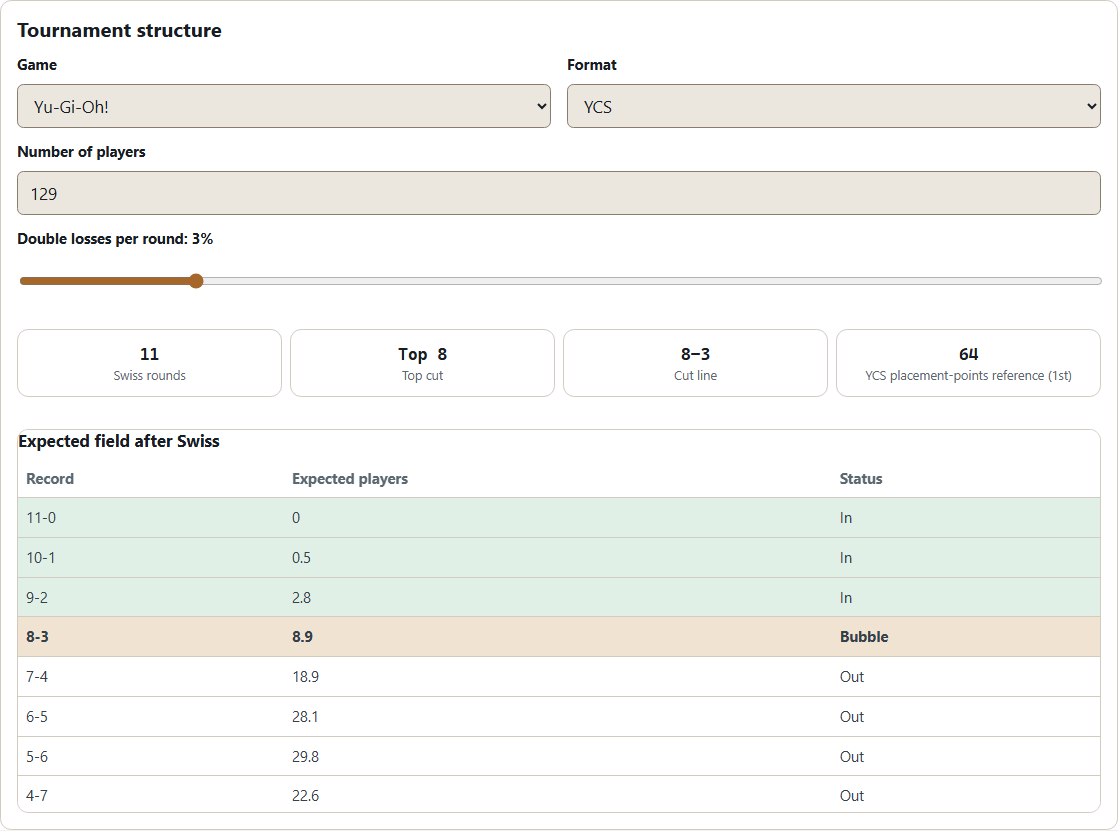
- Keep the visible model assumptions in the screenshot or test note, including draw or double-loss settings if the selected preset exposes them.
- For this practice scenario, fill all seven rounds: five wins followed by two losses. A partial record estimates the current standing only; remaining rounds are not simulated and no final qualification probability is shown.
- Run the final estimate and record the result, the full sequence and the visible assumptions. The Generic Swiss record is 5–2 with 15 match points. The qualification percentage depends on the model assumptions; identical inputs in the current tool version return the same estimate.
- Change only the cut to Top 16, keep the other inputs and the seven results unchanged, then run the calculation again. Changing a parameter clears the previous estimate, so record both runs before comparing.
Expected reasoning: for this Generic Swiss comparison, changing only Top 8 to Top 16 cannot reduce the displayed qualification probability. If it does, verify that the other inputs and the measured outcome are identical, then report the discrepancy with both configurations before relying on the estimate.
How to verify the answer before relying on it
Use three checks:
- Check the event source. Look for the current organizer document, event operations document or official announcement. Do not reuse last season’s numbers by habit.
- Check the model inputs. Attendance, rounds, cut size, match points, draw handling and tiebreaker assumptions should match what you actually want to study.
- Check repeatability in the current tool version. Identical inputs should return the same estimate. If the displayed value changes, recheck the settings and report the discrepancy with the recorded inputs. Repeating a calculation does not add a new independent sample or reduce model uncertainty.
For a separate exercise, Random Number Generator can produce sample values. The tournament calculator does not expose a seed field, and random draws do not validate its model.
Limits and when not to use the estimate
Do not use this estimate as official policy, legal advice, betting advice or qualification advice. It is also weak for events where players intentionally draw, drop strategically, receive byes, face skill distributions that are far from equal, or where pairing software uses procedures the model does not implement. Tiebreakers can dominate bubble positions, and simplified tiebreakers are not a substitute for official standings.
The strongest use is comparison: “same visible assumptions, different cut size” or “same played results, different event structure.” The weakest use is prediction: “this player will qualify.”